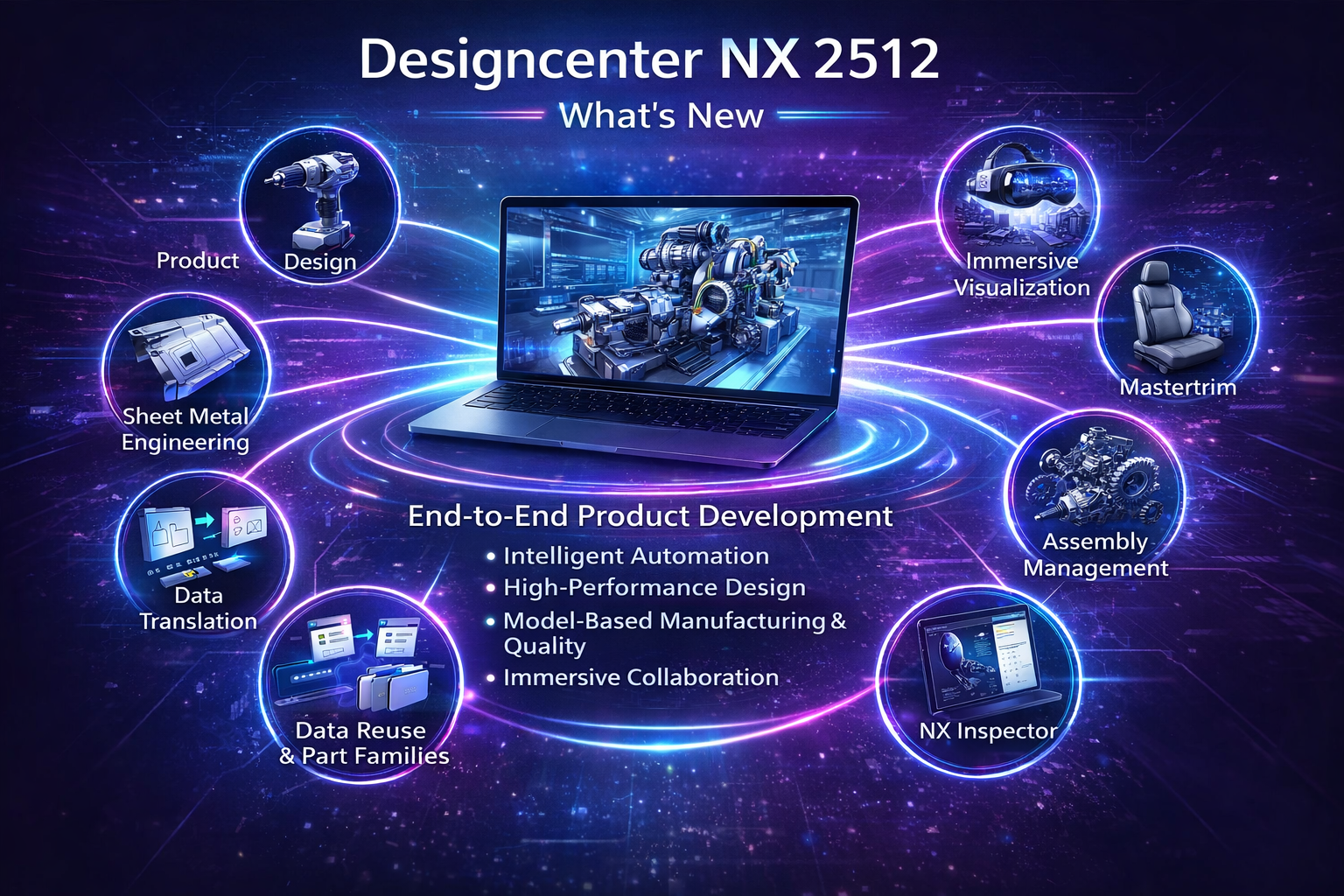
Designcenter NX 2512 further strengthens its role as the core platform of the comprehensive Digital Twin, delivering major enhancements across 3D product design, sheet metal design, and complex assembly management. This release focuses on workflow efficiency, stronger associativity, and enhanced collaboration, making it especially valuable for manufacturing companies in mechanical engineering, automotive, aerospace, and industrial equipment sectors.
Designcenter NX 2512 further strengthens its role as the core platform of the comprehensive Digital Twin, delivering major enhancements across 3D product design, sheet metal design, and complex assembly management. This release focuses on workflow efficiency, stronger associativity, and enhanced collaboration, making it especially valuable for manufacturing companies in mechanical engineering, automotive, aerospace, and industrial equipment sectors.
1. Key Enhancements in Product Design (NX Design)
Sketch – Enhanced Mechanism Mode for Highly Engineered Workflows
NX 2512 introduces Enhanced Mechanism Mode for Sketch, designed for template-based and highly engineered design workflows.
Key highlights:
Persistent relations are created automatically during sketching and snapping
All dimensions are driven by expressions
Legacy sketches are automatically upgraded to Mechanism Mode
Improved stability and reliability for parametric updates
This significantly reduces sketch failures in complex, change-driven designs.
Figure 1
Pattern Feature – Support for Advanced and Modifying Features
Pattern Feature capabilities are expanded to support modifying features such as:
Replace Face
Divide Face
Offset Curve in Face
This enables efficient creation of complex, variational patterns, commonly required in tooling, fixtures, and precision mechanical components.
Figure 2
Boolean and Mirror Body Enhancements for Template Design
NX 2512 delivers major improvements to Boolean and Mirror Body operations, optimized for reusable design templates:
Support for non-intersecting target and tool bodies
Option to ignore sheet bodies during Boolean operations
Mirror Body enhancements with automatic source body deletion
These updates help reduce model clutter and improve robustness in template-driven design environments.
Figure 3Figure 4
Higher Surface Quality for Swept and Lofted Geometry
The Split Output along Boundary Curves option allows users to:
Create multiple high-quality surfaces using a single feature
Maintain internal continuity between surfaces
Achieve consistent behavior across Sweep, Loft, and Mesh surface commands
This is especially beneficial for Class-A and advanced surface modeling.
Figure 5
2. Sheet Metal Design – Simpler, More Precise Workflows
Flange – Keypoint Enhancement
NX 2512 introduces a new flange creation technique that allows flanges to:
Extend to an external keypoint
Be created at a defined angle
This enhancement improves flexibility when designing complex sheet metal parts with precise assembly requirements.
Figure 6
Lightning Cutout – Separate Standards Tables
Lightning Cutout functionality now supports separate standards tables for:
Hole-based cutouts
User-defined sketch-based cutouts
Standards tables can be configured based on material properties, helping organizations:
Standardize sheet metal designs
Ensure manufacturability
Easily adapt to different production standards
Figure 7
3. Assemblies – Improved User Experience and Advanced Collaboration
Major Assembly Constraint User Experience Enhancements
NX 2512 introduces extensive improvements to assembly constraint workflows:
Create constraints directly without dialog boxes
Prevent creation of conflicting constraints
Move components using temporary constraints
Magnetic Snap for drag-and-drop constraint creation
These enhancements significantly reduce the number of clicks required when building large assemblies.
Figure 8
Copy and Paste with Constraint Retention
When copying and pasting components:
Internal constraints are preserved automatically
Supports pasting across subassemblies and NX windows
Paste Special option available to remove constraints (legacy behavior)
This improves productivity and maintains design intent during assembly reuse.
Figure 9
Multi-Configuration Design Worksets
NX 2512 introduces Multi-Configuration Design Worksets, enabling users to:
Load the same assembly with different configuration rules
Compare multiple design variants in a single session
Perform design changes in context
This capability is especially valuable for product variants, engineering changes, and what-if design studies.
Figure 10
4. Performance and Real-Time Collaboration
Performance Improvements for Large Assemblies
Faster reference set changes on minimally loaded components
Nearly 2× faster “Make Work Part” operations with minimal load data
These improvements enhance responsiveness when working with large assembly structures.
Figure 11
Real-Time Collaboration in Designcenter X
NX 2512 enhances collaborative design with:
Notifications for check-in, check-out, and save operations
Ability to follow critical components
Live Share for simultaneous multi-user editing
User presence indicators and Microsoft Teams integration
Engineering teams can now collaborate more effectively while reducing conflicts and rework.
Figure 12
5. Business Benefits of Designcenter NX 2512
With Designcenter NX 2512, manufacturing organizations can:
Increase productivity in product and assembly design
Standardize sheet metal design workflows
Build and reuse robust design templates
Enable efficient multi-user collaboration
Shorten overall product development cycles
Figure 13Figure 14Figure 15
6. Join – Smarter and More Automated Joining Definitions
Designcenter Join in NX 2512 continues to evolve as a powerful solution for defining fasteners, welds, and adhesives across multiple industries, with a strong focus on automation, data consistency, and downstream usability.
Key enhancements in NX 2512 Join:
Wave Link Options Automatically assign materials to wave-linked faces, eliminating manual post-processing and preventing unnecessary material assignments.
Figure 16
Intelligent Feature Naming Join features are now named automatically based on object type and container attributes, removing the need for custom NX Open programs.
Figure 17
Precision Control for Join Notes Users can define numeric precision, resulting in cleaner, more readable manufacturing annotations.
Figure 18
Selective Check-Mate Testing Run validation tests on selected subsets of Join features, saving time on large and complex join containers.
Figure 19
RSD Integrated Pipe Join Fully integrated with Routed Systems Designer (RSD), enabling automatic creation of pipe welds and mechanical flanges based on rule-driven Excel tables.
Figure 20
Business impact: Faster join definition, higher data quality, and smoother integration with downstream manufacturing and validation workflows.
7. Data Translation – Reliable Multi-CAD Data Exchange
NX 2512 strengthens Data Translation capabilities to ensure high-quality geometry and PMI exchange across heterogeneous CAD environments.
Figure 21
Highlights:
Improved robustness when importing and exporting complex geometry and assemblies
Better preservation of PMI and associative data during translation
Reduced healing and rework when working with supplier or customer CAD data
These improvements help organizations confidently collaborate in multi-CAD supply chains while maintaining design intent and model fidelity.
ECAD & MCAD
BIM & IFC in Construction Modeling
Rhino Subdivision Geometry SupportMaterial & Density Support in CATIA V5 & PTC Creo
8. Immersive Visualization – Design Reviews in True 3D Context
Immersive Visualization in Designcenter NX 2512 delivers major usability, performance, and collaboration enhancements, enabling engineers and stakeholders to experience designs at full scale using desktop, VR, and XR workflows.
Figure 22
What’s new in Immersive Visualization:
Live Updates in Immersive Collaboration Design changes made by the meeting leader are streamed live to all participants.
Major Performance Improvements Up to 75% memory reduction and up to 6× faster load times through improved geometry instancing and parallel processing.
New Immersive Scenes and User-Defined Environments Ocean, racetrack, infinite field, and custom HDR-based scenes for realistic context.
Global Selection in Immersive Designer Consistent selection behavior between NX desktop and immersive environments.
Immersive Walkthrough Mode Desktop and gamepad-enabled walkthroughs for ergonomic studies and spatial validation.
Redesigned Immersive Toolset and Radial Menu Improved ergonomics and faster access to common commands.
Use cases: Design reviews, ergonomics validation, virtual commissioning, training, and executive sign-off—without physical prototypes.
Figure 23
9. Mastertrim – Advanced Seat and Interior Trim Engineering
Mastertrim in NX 2512 supports concurrent engineering for seat systems and interior components, especially in automotive and aerospace applications.
New and enhanced capabilities:
Extended Concavity Analysis Includes adjacent flat areas to identify potential manufacturability issues earlier.
Figure 24
Improved Notch Analysis Accuracy Percentage-based misalignment metrics and enhanced 3D analysis for better sewability decisions.
Figure 25
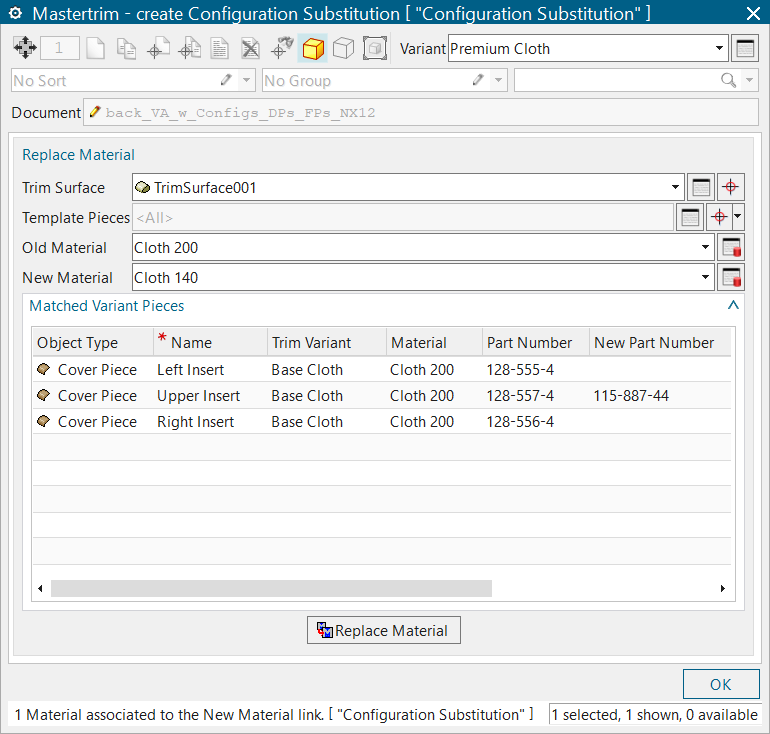
Configuration Substitution Utility Swap materials across variants without changing part numbers, ensuring Teamcenter data consistency.
Figure 26
Key benefits: Reduced reliance on physical prototypes, faster time to first article, improved cost estimation accuracy, and higher automation.
Figure 27
10. NX Inspector – Model-Based Quality and PMI Consumption
NX Inspector in Designcenter NX 2512 enables consistent interpretation and downstream consumption of PMI (Product Manufacturing Information), supporting model-based enterprise initiatives.
Key advancements:
Native Support for DMSC Model-Based Characteristics (MBC) NX Inspector is the first CAD-native implementation of the DMSC MBC standard.
Figure 28
Direct Associativity to PMI Characteristics update automatically when PMI changes.
Figure 29Figure 28
Improved Geometry Highlighting Clear visual identification of geometry associated with each characteristic.
Figure 29
CAD-Neutral Outputs Support for PLMXML and QIF formats for downstream quality and metrology systems.
Figure 30
Deep Teamcenter Integration Characteristics are managed as revisable objects with full history, traceability, and change notifications.
Figure 31
Value: A true digital thread from design to quality inspection and manufacturing.
11. Data Reuse & Part Families – Faster Variant Design
NX 2512 enhances Data Reuse and Part Families to help engineering teams efficiently manage product variants and configurable designs.
Improvements include:
Easier creation and management of part families
Figure 32
Better control of variant parameters and expressions
Figure 33
Improved reuse of proven designs across multiple products
Figure 34
This reduces engineering effort, minimizes errors, and accelerates time-to-market for configurable product lines.
Figure 35
Final Takeaway
Designcenter NX 2512 represents a significant advancement in Product Design, Sheet Metal Engineering, and Assembly Management, Join, Data Translation, Immersive Visualization, Mastertrim, NX Inspector, and enhanced Data Reuse & Part Families, it delivers a truly end-to-end solution for:
Design more complex products faster and with greater confidence
Scalable variant management
Model-based manufacturing and quality
Immersive, real-time collaboration
For manufacturers pursuing digital transformation and a comprehensive Digital Twin strategy, NX 2512 represents a major leap forward in productivity, quality, and collaboration.
With a global network of partners and a team of professional instructors, Edura is committed to providing the most engaging and up-to-date courses to help you improve your skills and gain new knowledge.
.png)
.png)
.png)
.png)
.png)
.png)
.png)
.png)
.png)
.png)
.png)
.png)
.png)
.png)
.png)
.png)
.png)
.png)
.png)
.png)
.png)
.png)
.png)
.png)
.png)
.png)
.png)
.png)
.png)
.png)
.png)
.png)
.png)
.png)
.png)
.png)
.png)
.png)
.png)
.png)
.png)
.png)