The Designcenter NX 2606 release continues to reinforce its direction as a comprehensive and flexible engineering design platform capable of supporting the entire product development process. With a focus on streamlining workflows, improving stability, and enhancing productivity, the new release introduces several notable updates across Core Design, Advanced Shape Design, and Algorithmic Modeling.
The enhancements in NX 2606 not only enable engineers to work more efficiently but also provide greater control over models, maintain data associativity, and better support complex design workflows.
One of the key highlights of NX 2606 is the ability to create and manage Persistent Relations during Sketch creation and editing.
Geometric relations can be automatically detected and maintained when users:
Users can also review, display, or remove individual relations as needed. Once a relation has been deleted, it will not automatically reappear, helping prevent unwanted constraints from being reintroduced into the Sketch.
This enhancement is particularly useful for complex models with intricate Sketches, numerous dimensions, and stringent requirements for precise geometric control.
.png)
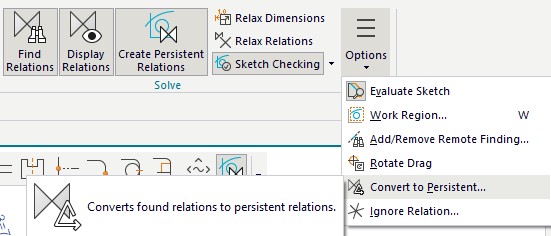
2. More Stable and Predictable Sketch Editing
NX 2606 significantly improves stability when editing an inactive Sketch.
In most cases, the system only uses the relations that existed when the Sketch was completed and does not automatically create new relations during the editing process. As a result, editing becomes more predictable while reducing constraint-solving time.
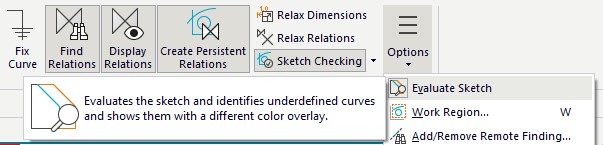
The ability to maintain the original connections between curves also helps minimize geometric errors when users modify the dimensions, position, or structure of a Sketch. In addition, the Show Movable command has been renamed Evaluate Sketch, making it easier for users to identify and evaluate objects that are still free to move.
The Delete Face feature in Synchronous Modeling has been enhanced to provide more effective support for model simplification workflows prior to CAE analysis.
NX 2606 allows users to delete faces belonging to multiple bodies in a single operation. If some faces cannot be deleted, the command can still complete successfully for the valid objects while providing specific information about the faces that failed.
This enhancement helps engineers reduce model cleanup time, particularly when removing holes, fillets, or small unnecessary features before meshing and performing simulations.
.png)
Pattern Feature has been expanded to support additional dependent features and features that modify geometry.
In addition to features already supported in previous versions, such as Replace Face, Divide Face, and Offset Curve in Face, NX 2606 adds support for:
This expansion is particularly useful for variable pattern models, where each instance requires individual adjustments rather than simply replicating identical geometry. As a result, engineers can build complex structures while maintaining the model’s parametric behavior and associativity.
.png)
NX 2606 enhances data associativity between design and simulation through Object Groups combined with attributes.
Faces and edges can be grouped based on logical conditions using Selection Intent and Selection Program. Attributes assigned to Object Groups are preserved when geometry is WAVE Linked to another environment.
This enables boundary conditions, loads, refined mesh regions, and other simulation-related information to be applied in an associative manner. When the design model changes, simulation data can also be updated more consistently.
Leveraging Attributes for Mesh Refinements
.png)
The Extended-Scale Modeling capability in NX 2606 enables users to work with models ranging in size from the nanometer scale to several kilometers.
When the part unit is set to micrometers, users can create features at the nanometer scale, making NX suitable for applications such as semiconductors, MEMS, and microscale devices. Conversely, meter-based units can be used for large-scale conceptual designs, such as construction projects or models positioned far from the coordinate origin.
This capability expands NX’s range of applications, allowing a single platform to meet diverse design requirements across specialized industries.
Nanometer sized features
.jpg)
Large construction projects
.png)
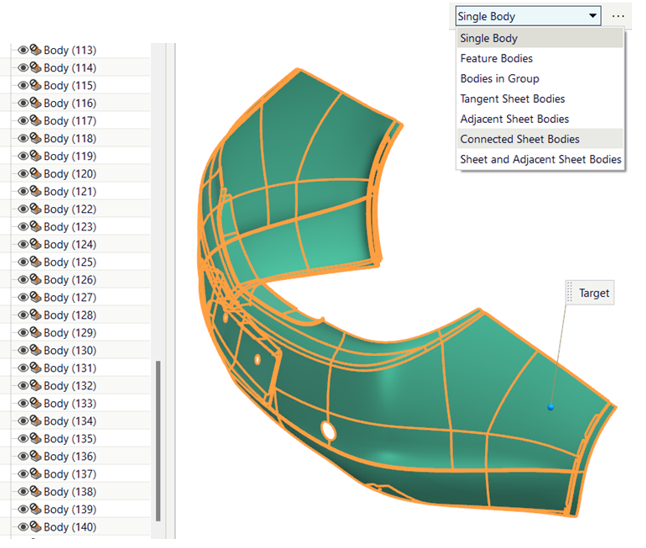
In Advanced Shape Design, the Sew and Combine commands have been significantly enhanced to improve the speed of selecting sheet bodies that are connected or tangent to one another.
A new spatial recognition algorithm enables users to quickly select and join hundreds of sheet bodies while maintaining the individual part structure through Selection Intent.
This enhancement is particularly valuable for complex surface models imported from other systems or products containing a large number of sheet bodies.
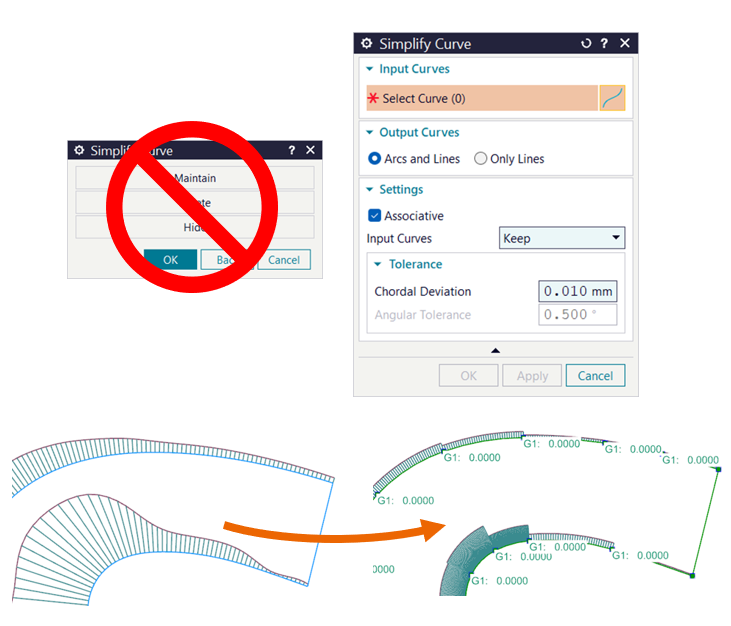
The Simplify Curve command has been modernized to provide a stable and fully associative workflow for converting complex splines into a series of arcs and lines with tangential continuity.
Users can choose to:
Simplifying splines helps improve data quality for downstream processes such as machining, drawing creation, inspection, and data exchange with other systems.
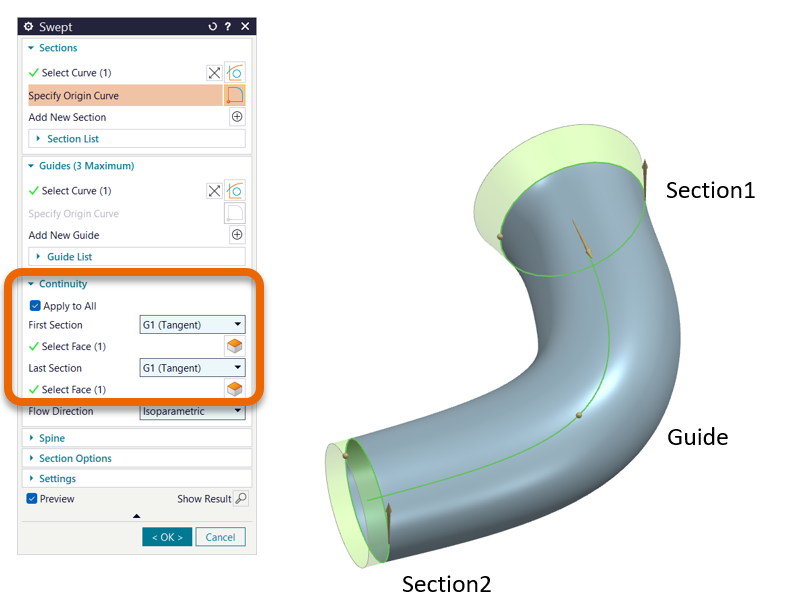
NX 2606 introduces continuity conditions directly within the Swept command, allowing users to define continuity at the start section, end section, or both ends simultaneously.
This capability helps create more precise and smoother transition surfaces, particularly for styling, product housings, aerodynamic components, and products requiring high-quality surface finishes.
The new options are also designed consistently with other surface creation tools in Designcenter, making the workflow more intuitive and consistent.
In Algorithmic Modeling, NX 2606 focuses on improving the user experience when working with the Logic Editor.
Enum option lists can now be controlled using rules. The value selected in one list can determine the content displayed in the next, making it possible to create smarter, more context-aware dialogs tailored to specific design scenarios.
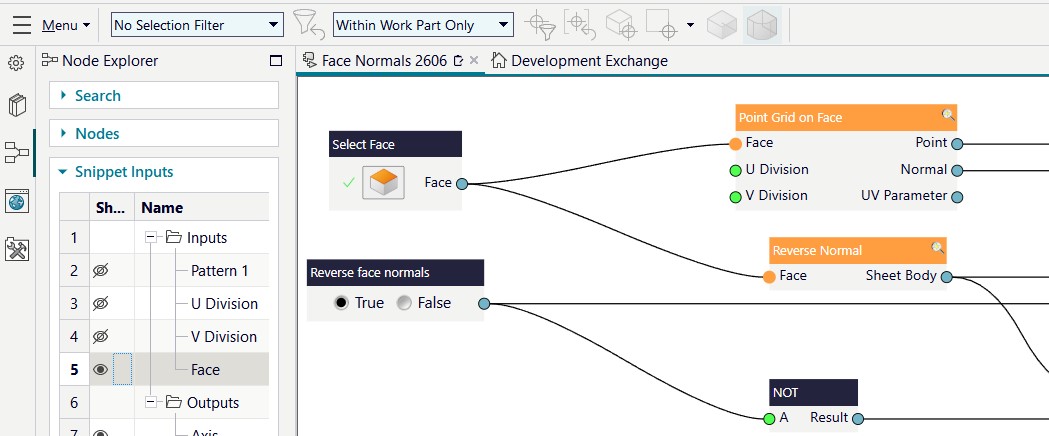
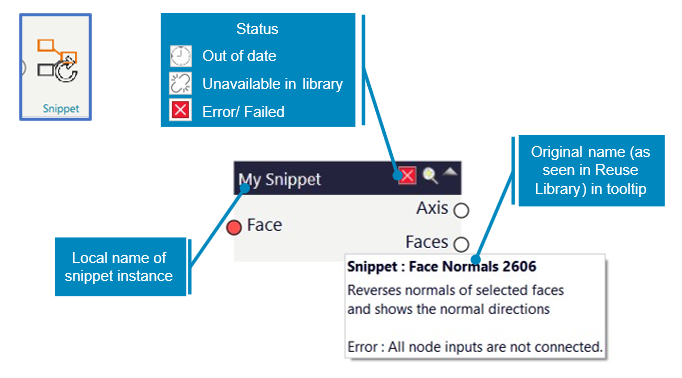
The Snippet functionality has also been enhanced with the ability to:
These enhancements make Algorithmic Modeling more accessible to users without programming expertise while helping organizations standardize and efficiently reuse design logic.
Designcenter NX 2606 delivers a range of practical enhancements focused directly on improving design productivity and quality. From Sketch control, pattern handling, and synchronous geometry editing to surface design and algorithmic modeling, the new capabilities are designed to reduce manual operations, improve stability, and maintain data associativity throughout the product lifecycle.
With these updates, NX 2606 not only helps engineers address current design requirements more efficiently but also provides a foundation for automated, flexible, and scalable product development workflows in the future.